


Kemppi HR55 Hand Remote 10-Pin 10M
HR55 is a wired hand remote with a digital display. It enables welding power and channel adjustment, process selection, and safety lock setting when working farther away from the wire feeder or in tight spaces. The wire length is 10 meters. The remote is compatible with X5 FastMig and Master M 350 series.
Using remote control HR55
When connected, the HR55 remote control is automatically in use.
With the optional digital remote control HR55, you can select memory channels and adjust wire feed speed, welding current, welding voltage or voltage fine tuning depending on the welding process and the features supported by the connected X5 FastMig equipment.
In a double wire feeder setup, the remote-controlled wire feeder can be selected directly from the remote without moving the cable.
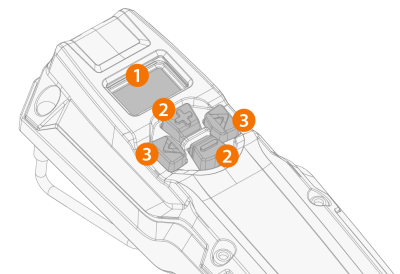
| 1. | Custom LCD display |
>> Displays the adjusted parameter and notifies if there is an error ("Err") in the welding system.
| 2. | Plus/minus (+/-) buttons |
>> Changes the parameter value.
| 3. | Left/right arrow buttons |
>> Changes between adjustable parameters/views.
Remote control display items
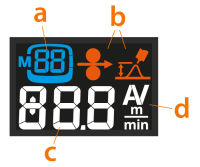
| a. | Process and/or selected memory channel information (process is indicated with a single letter: M = MIG/MAG, S = MMA, G = Gouging, t = TIG) |
| b. | MIG/MAG: Wire feed speed and fine tuning symbols |
| c. | Adjusted parameter value (or error indicator) |
| d. | Adjusted parameter unit |
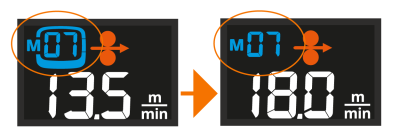
When the parameter is adjusted with the remote and the parameter value doesn't reflect the one saved on the selected memory channel anymore, this is indicated on the display by showing only the memory channel number without the channel box around it (MIG/MAG only):
Remote control views and operation
Change between the views by pressing the left/right arrow buttons.
| • | Memory channel view (MIG/MAG only): The memory channel is changed by pressing the +/- buttons. Long press of a +/- button scrolls the parameter values faster. |
| • | Process selection view: This allows selecting between MIG/MAG welding, MMA welding and gouging. |
| • | Welding power view: Depending on the used welding process, wire feed speed or current is adjusted by pressing the +/- buttons. Long press of a +/- button scrolls the parameter values faster. |
| • | Voltage/Fine tuning view: Depending on the welding process used, voltage or welding process specific parameter is adjusted by pressing the +/- buttons. Long press of the +/- button scrolls the parameter values faster. Long press of the right arrow button switches between different parameter sets, as applicable. |
| • | Wire feeder selection view (double wire feeder setup only): The remote-controlled wire feeder is changed by pressing the +/- buttons. |
| • | Safety lock: By pressing the left/right arrow buttons simultaneously for 2 seconds, the equipment safety lock can be enabled and disabled. |
Long press of the left arrow button saves the adjusted parameters on the currently selected channel.
 |
When a MIG welding torch remote control is used to select a memory channel or adjust the wire feed speed, the corresponding function is disabled in the HR55 remote control. |
|
In a double wire feeder setup, changing the remote-controlled wire feeder directly from the remote takes approximately 20 seconds. The remaining time is indicated in the remote control display. |